
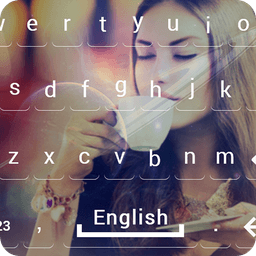
Screenshots
About My Photo Keyboard
Transform your typing experience with My Photo Keyboard, the ultimate photo keyboard customization app that lets you personalize every aspect of your device's input method.
Want to display your favorite photos on your keyboard background? Looking for extensive keyboard theme options? My Photo Keyboard delivers both and more. This comprehensive keyboard customization tool empowers you to create a truly unique typing experience that reflects your personal style. Whether you prefer nature scenes, cute animals, bokeh effects, or beautiful heart designs, you'll find stunning pre-loaded backgrounds ready to use—or upload your own photos directly from your phone gallery.
Beyond visual customization, My Photo Keyboard offers powerful personalization at every level. Choose from 20+ input languages to match your communication needs, then refine your keyboard's appearance with complete control over text colors, popup colors, background gradients, solid colors, and modern font styles. The color palette picker makes it simple to find exactly the shade you want, while the extensive font library ensures your keyboard matches your personality.
Take control of your typing behavior through comprehensive preference settings. Enable auto-correction, personalized suggestions, contact name suggestions, and offensive word blocking for smarter communication. Customize vibration feedback, sound effects, keyboard size, emoji switching, voice input access, and auto-capitalization to suit your habits. For advanced users, fine-tune keypress vibration duration, sound volume, key long-press delay, popup dismiss timing, and even enable space bar trackpad functionality with delete swipe gestures.
The text correction engine learns from your usage patterns, building a personal dictionary that anticipates your needs and displays correction suggestions in real time. Whether you're typing quickly or carefully crafting messages, these intelligent features adapt to your communication style.
Customization extends to every visual element. Select background photos from the app's curated collection or import any image from your camera roll. Apply gradient backgrounds or solid colors from an extensive palette. Adjust text color, popup color, and font style independently to create harmonious designs. Advanced settings let you control everything from vibration strength to sound volume to key response timing.
Stand out with a keyboard that's uniquely yours. Impress friends and family with your personalized My Photo Keyboard setup, complete with your favorite photo background and perfectly tuned settings. Whether you prioritize aesthetics, functionality, or both, this app delivers the flexibility to design a keyboard experience that's authentically you.
Pros & Cons
Pros
- Upload and display your own photos as keyboard backgrounds
- 20+ input languages with extensive customization options
- Adaptive text correction engine learns your typing patterns
- Fine-grained control over vibration, sound, and key response timing
Cons
- Requires camera roll and gallery access to import personal photos
- Learning curve to configure advanced settings like key delay and vibration duration
- App customization applies only within the keyboard itself, not system-wide
- Text correction relies on usage data, may suggest inaccurate words initially
Frequently asked questions about My Photo Keyboard
Is My Photo Keyboard safe to download?
A malware scan report for this version of My Photo Keyboard is not available on Unstore yet. Only install files from sources you trust and keep your device's security protection turned on.
What are the system requirements for My Photo Keyboard?
My Photo Keyboard runs on Android. It requires Android 6.0 (Marshmallow) or later. The download size is 37.9 MB.
What is the latest version of My Photo Keyboard?
The latest version of My Photo Keyboard on Unstore is 3.0. It was last updated on July 27, 2026.
Who develops My Photo Keyboard?
My Photo Keyboard is developed by Balint Infotech.
Related Apps

AlienGUIse
Desktop themes and manager for Windows — transform your system with 5 futuristic designs.

SharpKeys
Remap keyboard keys to launch apps, media controls, and custom commands on Windows.

RocketDock
Desktop launcher for Windows — quick access dock with customizable icons and positioning.

Custom Resolution Utility (CRU)
Display resolution utility: Create custom resolutions for your monitor with precise refresh rate control.

Lagguy Wallpapers
Lagguy
4K & HD wallpapers for Android — minimal, abstract, nature, AMOLED designs with lifetime access

Lock Screen OS
Apps Genz
Customize your lock screen with widgets, photos, and notifications. Replace Android's default lock screen.
Latest Articles

Play a free Color Ball Sort Puzzle-style game in your browser (no download)
Oct 6, 2026

Play a free Beach Buggy Racing-style kart racer in your browser (no download)
Oct 6, 2026

Play a free Alto's Adventure-style game in your browser (no download)
Oct 6, 2026

Free online whiteboard like Jamboard: use Quickboard in your browser, no signup
Oct 6, 2026

Free online running pace calculator: splits, race predictor and daily challenge, no download
Oct 6, 2026